
 Little Angels Worksheets is a Facebook Page full of downloadable materials, activities and worksheets for early years students, starting from Kindergarten level. New content is added everyday. Visit their page to access their (free) worksheets and resources.
Tag Archives: Digital Resources
STEM UK – Resources for Primary, Secondary and Post-Secondary Educators and Students
 STEM UK aims to achieve a world-leading STEM education for all young people. Supported by a unique partnership of Government, charitable trusts and employers, STEM UK are dedicated to raising young people’s engagement and achievement in STEM subjects and careers. Their website offers a myriad of information as well as downloadable lessons for teachers and students. Visit the STEM UK website to access resources across a wide range of STEM subjects, including Digital Literacy, Science, Mathematics, Computing, and Design & Technology.
Online Book on eSafety for Students, Parents & Educators

Tackling online safety issues, such as digital reputation, fake news, screen time, cyberbullying or sextortion, is becoming increasingly important these days. The tips for parents, teachers and students compiled in this booklet will show you where to start!
Click here to access the booklet: eSafety Booklet for Students, Parents and Educators.
Free Coronavirus Digital Book for Students
 Axel Scheffler has illustrated a digital book for primary school age children, free for anyone to read on screen or print out, about the coronavirus and the measures taken to control it. Published by Nosy Crow, and written by staff within the company, the book has had expert input: Professor Graham Medley of the London School of Hygiene & Tropical Medicine acted as a consultant, and the company also had advice from two head teachers and a child psychologist. Continue reading
Learning Tutorials: Using 123App Audio and Video Recorder
St. Nicholas College is preparing a set of learning tutorials for educators to use for online teaching. In this first episode, you will find a step-by-step guide of how to use the voice and video recorder features on the site 123Apps that allows you to record videos and take pictures with your webcam. All you need is a web camera and a good internet connection. This can be used to explanatory videos for students to watch from home.
Click on the following video to view this tutorial:
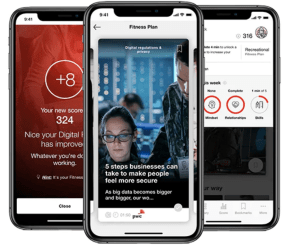
Digital Fitness App – Available for Free until 31 July 2020
PwC Digital Fitness app helps to test your digital fitness and also boost your digital skills. Whether it’s self-aware robots, smart clothing, or an unhackable Quantum Internet, there are a lot of cutting-edge inventions out there. Additional benefits and topics:
- Learn about the new privacy laws and how they impact you
- Discover how innovation happens
Currently both the app and its training content available for free until 31 July 2020. Please visit this website for more details on how to get your free access code and download the app: https://www.pwc.com/mt/en/initiatives/digital-fitness.html.
Teacher Idea – Teaching Ideas for Students and Educators
The Digital Literacy Team (Primary) published the website Teacher Idea, aimed at Primary School Educators and Students. The website is constantly updated with teaching idea ‘cards’ which can be downloaded and used with students as activity starters. More ideas are added regularly, so be sure to check out the website from time to time. Furthermore, you can also submit your idea by filling in this form: http://bit.ly/ShareTeacherIdea.
Teacher Idea can be accessed by clicking on this link: Go To Teacher Idea

Kikkra Matematika – Ep. 3 & 4
Watch the videos of the third and fourth episodes of Kikkra Matematika Mid-Dar !
This project is produced entirely by the Primary Maths Support Team (DLAP – MEDE)
Teleskola – Your School at Home

Teleskola.mt was built to help parents, guardians, students and educators to easily find distance learning resources and lessons. There are sections with activities for students as well as teaching resources for educators/parents and guardians. Continue reading
Tour the National Parks of America on Google Earth
The US National Parks system has created virtual tours of the 31 most popular national parks in the America. Using satellite imagery from Google Maps, the site shows the U.S. from space, with small photos of each park serving as an icon. Click on one of those, or on one of the larger images of each location listed alphabetically on the right of the dashboard, and you’ll be whisked away to your destination.

Click on this link to begin this fascinating tour! – National Parks of America
 St.Nicholas College Malta